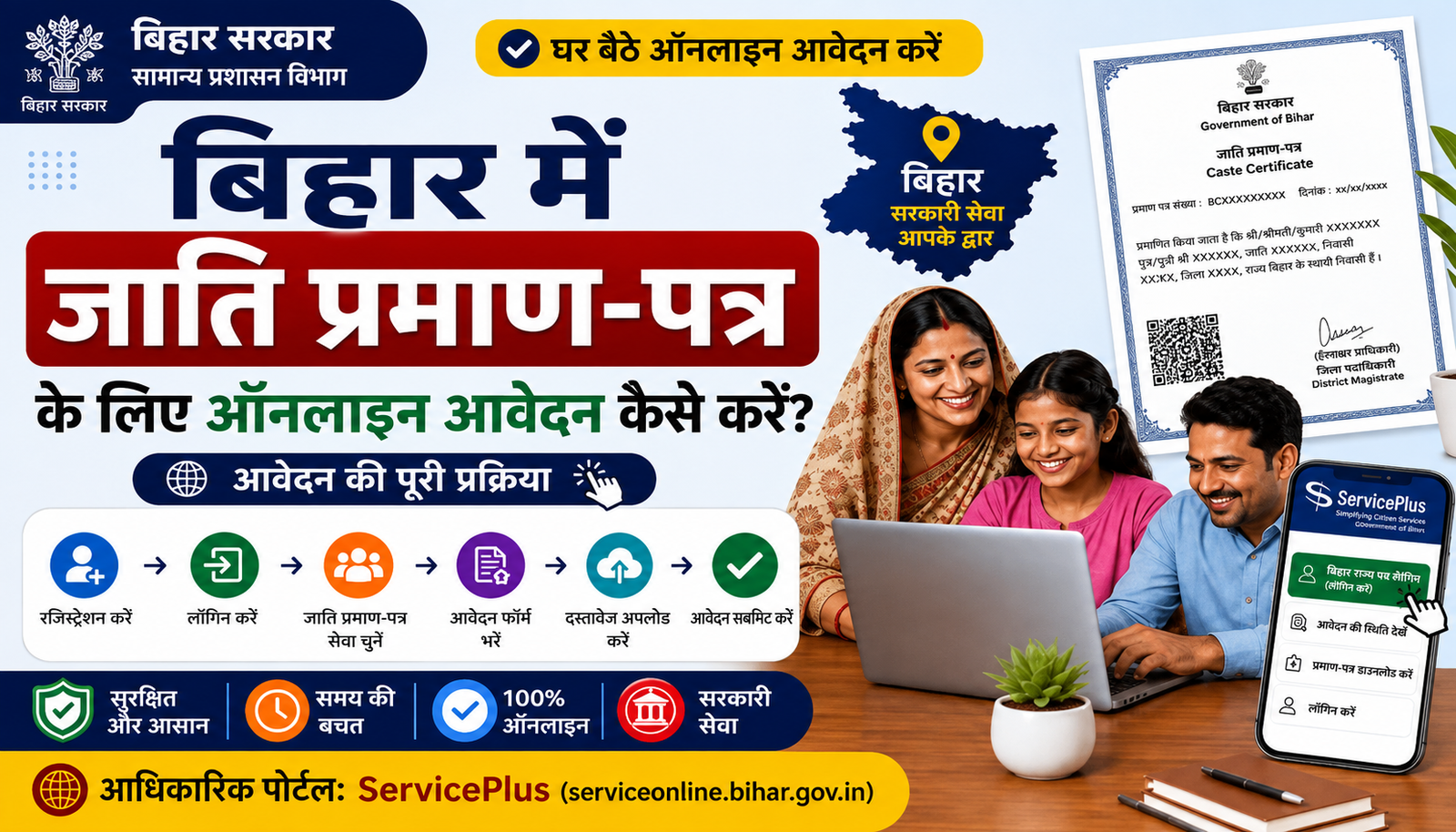
📄 Table of Contents
⚡ Quick Information
| Service | Issuance of Caste Certificate |
|---|---|
| State | Bihar |
| Department | General Administration Department, Government of Bihar |
| System | Bihar ServicePlus / RTPS |
| Mode | Online / Kiosk / By Hand |
| Service Level | RO/अंचल, SDO/अनुमंडल और DM/जिला |
| RO Level Delivery | 10 दिन, सरकारी छुट्टियों को छोड़कर |
| Official Portal | serviceonline.bihar.gov.in |
📝 Short Introduction
बिहार में जाति प्रमाण-पत्र (Caste Certificate) के लिए आवेदन Bihar ServicePlus/RTPS portal के माध्यम से किया जा सकता है। Official Bihar service list में जाति प्रमाण-पत्र की सेवाएँ RO level, SDO level और DM level पर उपलब्ध हैं।
RO level की official service details में आवेदन Online, Kiosk या By Hand माध्यम से करने का विकल्प दिया गया है। RO level service के लिए delivery period 10 दिन बताया गया है, जिसमें सरकारी छुट्टियाँ शामिल नहीं हैं।
इस guide में official portal खोलने से लेकर caste service चुनने, applicant details भरने, address और caste details दर्ज करने, documents/self-declaration, submission, status और certificate प्राप्त करने तक की प्रक्रिया आसान भाषा में दी गई है।
📄 आवेदन से पहले तैयारी
- आवेदक का सही नाम, पिता/माता/पति का नाम और gender details तैयार रखें।
- सक्रिय mobile number और email ID रखें।
- स्थायी पते की State, District, Sub-Division और Block/अंचल जानकारी तैयार रखें।
- अपनी Category, Caste और लागू होने पर Sub-Caste की सही जानकारी रखें।
- वर्तमान official form में दिखाई गई document checklist और self-declaration requirements पहले देखें।
- यदि पहले आवेदन किया गया है तो Application Reference Number सुरक्षित रखें।
📝 बिहार में Caste Certificate के लिए Online Application Process
Image Note: नीचे दिए गए सभी process images AI/UI Generated visual guidance हैं। ये official government screenshots नहीं हैं। वास्तविक Bihar ServicePlus portal पर fields या layout बदल सकता है।
Step 01: आधिकारिक Bihar ServicePlus पोर्टल खोलें
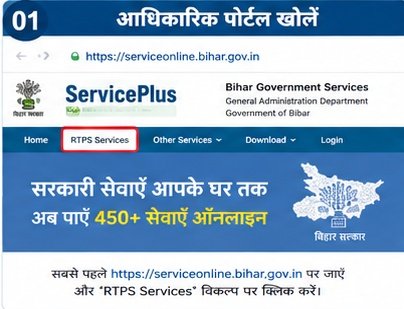
Bihar ServicePlus की official website खोलें और online/RTPS services तक जाएँ।
Step 02: Online / RTPS Services चुनें
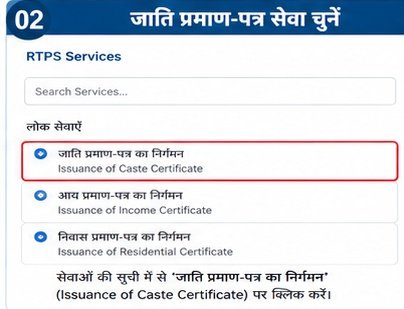
Portal के service menu में RTPS/लोक सेवाएँ वाला विकल्प खोलें।
Step 03: General Administration Department और Caste Certificate चुनें
General Administration Department के अंतर्गत Issuance of Caste Certificate service चुनें।
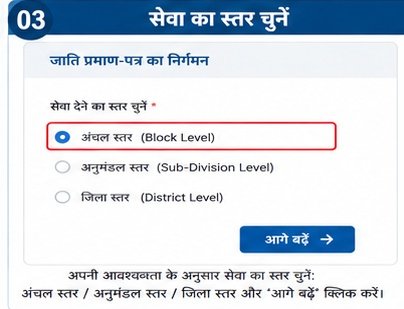
Step 04: अंचल/RO Level service चुनें
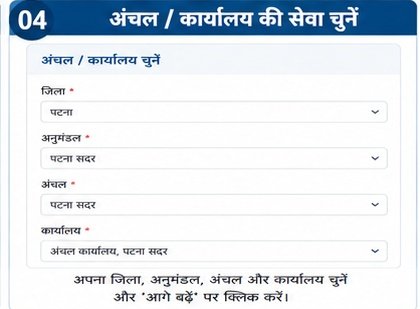
सामान्य आवेदन के लिए RO/अंचल level service देखें। Tatkal option जहाँ उपलब्ध हो, वहाँ current portal पर उसकी eligibility/option जाँचें।
Step 05: Applicant Details भरें
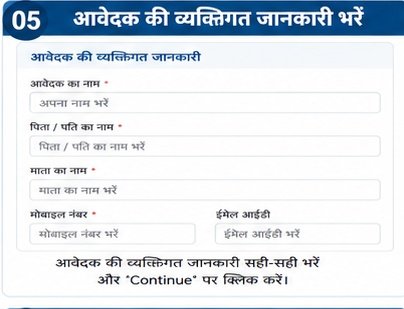
नाम, gender, पिता/माता/पति, mobile और email जैसी मांगी गई जानकारी सही भरें।
Step 06: Address Details भरें
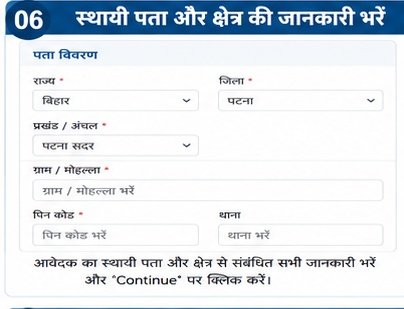
State, District, Sub-Division, Block/अंचल और local body/address fields को अपने वास्तविक पते के अनुसार भरें।
Step 07: Category, Caste और Sub-Caste भरें
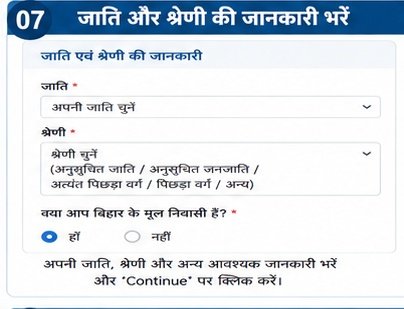
अपनी वास्तविक category/caste/sub-caste को official form में उपलब्ध विकल्प के अनुसार चुनें।
Step 08: Documents और Self Declaration पूरा करें
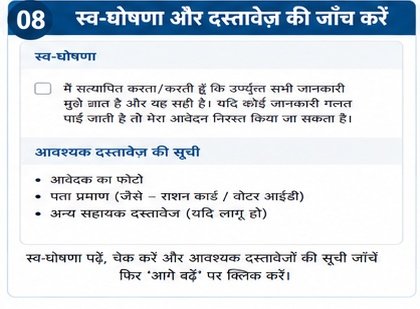
Current form की document checklist देखें, आवश्यक enclosure लगाएँ और self-declaration/consent पूरा करें।
Step 09: CAPTCHA और Final Submission करें
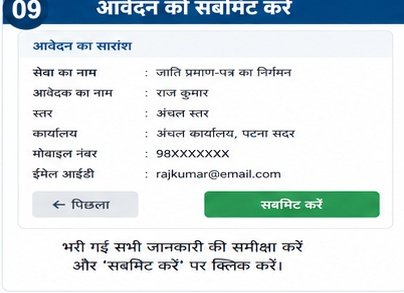
Word Verification/CAPTCHA पूरा करें, form को review करें और Submit/Proceed करें।
Step 10: Application Status देखें
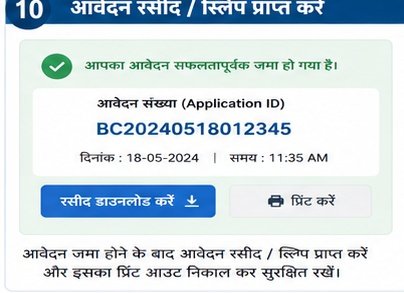
Application Reference Number/Acknowledgement सुरक्षित रखें और official portal की status facility से आवेदन की स्थिति देखें।
Step 11: Caste Certificate प्राप्त/Download करें
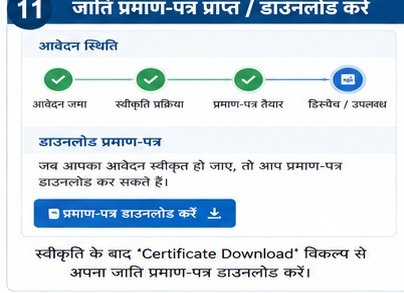
Certificate उपलब्ध होने पर official portal/SMS/Email/DigiLocker जैसी उपलब्ध delivery सुविधा के अनुसार प्राप्त करें।
📄 जरूरी Documents और जानकारी
Official Bihar RO-level Caste Certificate service details में Form-III Self Declaration को enclosure के रूप में सूचीबद्ध किया गया है। Current application form में document checklist service/level के अनुसार दिखाई जा सकती है, इसलिए final submission से पहले live official form में दी गई सूची को जरूर देखें।
- Form-III Self Declaration — जहाँ current form में लागू/मांगा गया हो।
- Applicant की personal और address information।
- Current official form में listed अन्य supporting enclosure/document।
- Applicant photograph और अन्य fields, जहाँ current form में required हों।
महत्वपूर्ण: अलग service level (RO/SDO/DM) या General/Tatkal option में document requirements अलग हो सकती हैं। इसलिए केवल current official form की checklist को अंतिम reference मानें।
🔍 Application Status और Certificate Download
आवेदन submit करने के बाद मिलने वाला Application Reference Number/Acknowledgement सुरक्षित रखें। इसी तरह की reference details का उपयोग application details/status देखने में किया जाता है।
Official Bihar ServicePlus system certificate delivery के लिए SMS download link, Email, DigiLocker और portal-based options जैसी सुविधाओं को support करता है। उपलब्ध option आपके application/service mode पर निर्भर कर सकता है।
⚠️ Important Points
- सही jurisdiction और service level चुनें।
- नाम, माता/पिता का नाम और address में spelling carefully check करें।
- Category और Caste वही चुनें जो आपके वास्तविक/मान्य records के अनुसार हो।
- Current portal की document checklist को final reference मानें।
- Application Reference Number/Acknowledgement का screenshot या PDF सुरक्षित रखें।
- OTP, password और personal documents अनजान व्यक्ति से share न करें।
- Certificate केवल official Bihar ServicePlus/RTPS portal से verify/download करें।
🔗 Official Website & Important Links
| काम | Official Link |
|---|---|
| Bihar ServicePlus / RTPS | Official Portal |
| Caste Certificate — RO Level Service | RO Level Service Details |
| Caste Certificate — RO Level Application | RO Level Application Form |
| Caste Certificate — SDO Level | SDO Level Service |
| Caste Certificate — District/DM Level | District Level Form |
❓ FAQs
बिहार में जाति प्रमाण-पत्र के लिए online आवेदन कहाँ करें?
Official Bihar ServicePlus/RTPS portal पर General Administration Department के अंतर्गत Issuance of Caste Certificate service से आवेदन किया जा सकता है।
जाति प्रमाण-पत्र के कौन-कौन से service levels हैं?
Official Bihar service list में RO level, SDO level और DM level Caste Certificate services operational दिखाई गई हैं।
RO level Caste Certificate कितने समय में मिलता है?
Official RO-level service details में 10 दिन की delivery period दी गई है, जिसमें सरकारी छुट्टियाँ शामिल नहीं हैं।
क्या Caste Certificate के लिए registration जरूरी है?
Official RO-level service details में registration की आवश्यकता नहीं बताई गई है। Portal पर service शुरू करते समय वर्तमान instructions को देखें।
क्या process images official screenshots हैं?
नहीं। इस package में process images AI/UI Generated visual guidance हैं। इन्हें official government screenshots के रूप में प्रस्तुत नहीं किया गया है।