⚡ Quick Information
| Service | Ration Card Member Addition / Correction |
|---|---|
| State | Bihar |
| Department | Food & Consumer Protection Department, Government of Bihar |
| System | RCMS / Jan Vitran Ann (JVA) |
| Mode | Online correction process |
| Official Portal | rconline.bihar.gov.in |
📝 Short Introduction
बिहार राशन कार्ड में परिवार के नए सदस्य का नाम जोड़ना है? Bihar के official Ration Card Management System में existing ration card modification के तहत member addition की सुविधा उपलब्ध है. Official manual में member list के action area में Add option दिया गया है.
🎯 नाम जोड़ने की जरूरत कब पड़ सकती है?
जब परिवार में किसी नए सदस्य का नाम राशन कार्ड में जोड़ना हो, तब existing ration card correction/modification process का उपयोग किया जा सकता है. Bihar Government के official system में existing ration card में member addition की सुविधा दी गई है.
✅ शुरू करने से पहले क्या तैयार रखें?
- Existing Ration Card Number
- जिस नए member का नाम जोड़ना है उसकी सही details
- Portal पर मांगी गई supporting information/documents
- Application/reference details, जहाँ लागू हों
💻 राशन कार्ड से सदस्य का नाम जोड़ने की ऑनलाइन प्रक्रिया
नीचे official Bihar Government manual के screenshots दिए गए हैं. जरूरत के अनुसार official image को crop/resize किया गया है और समझने के लिए presentation border तथा step heading जोड़ी गई है.
Step 1: Official portal खोलें
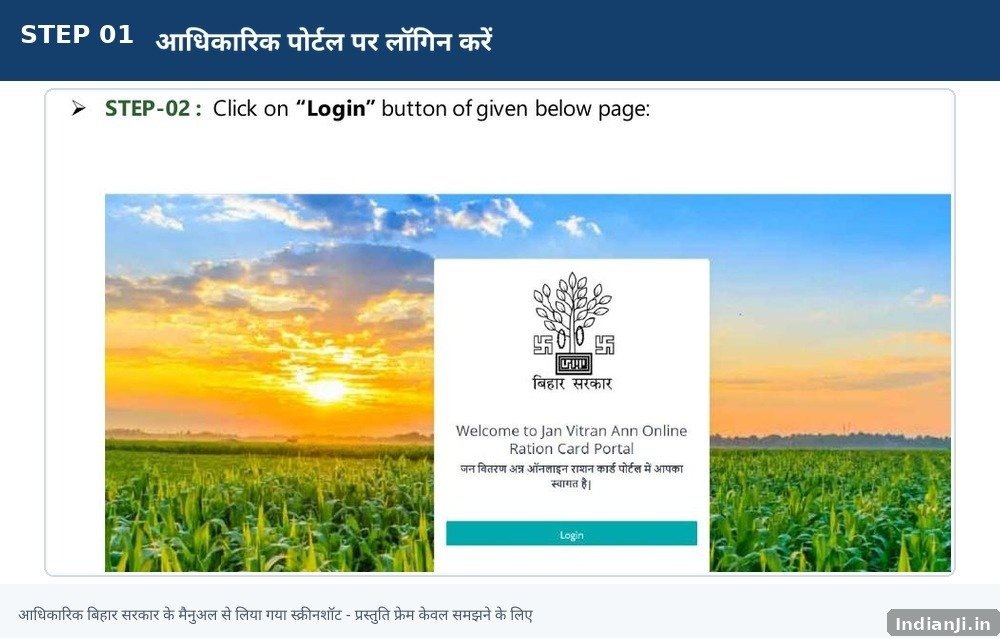
Official Bihar Government manual screenshot — relevant process area with a user-friendly presentation frame.
Bihar के official Ration Card / Jan Vitran Ann portal से existing ration card correction process शुरू करें.
इसके बाद: अगला step पूरा करें और final submission तक प्रक्रिया जारी रखें.
Step 2: Apply For Correction चुनें
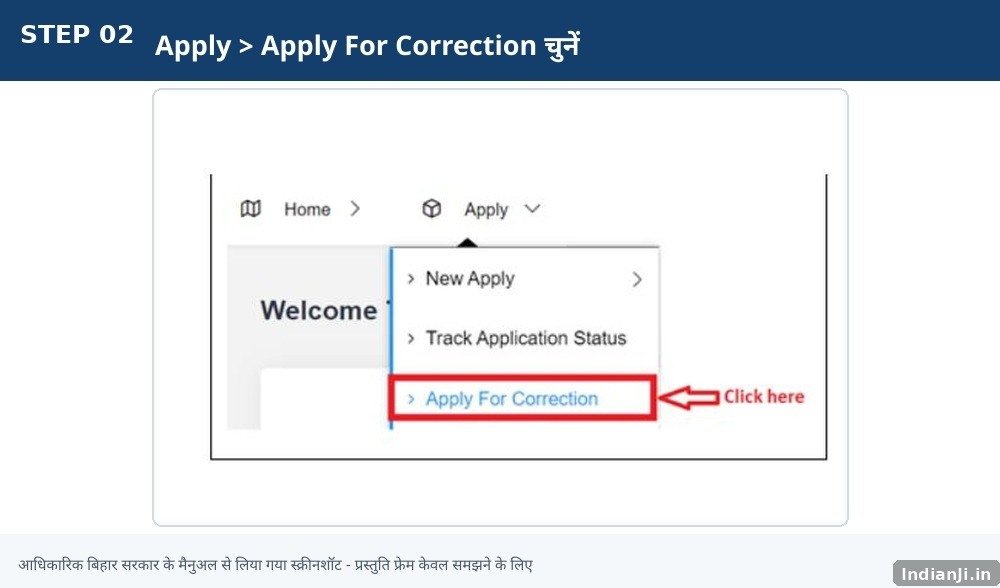
Official Bihar Government manual screenshot — relevant process area with a user-friendly presentation frame.
Apply menu में Apply For Correction option चुनें.
इसके बाद: अगला step पूरा करें और final submission तक प्रक्रिया जारी रखें.
Step 3: Ration Card Number से Search करें
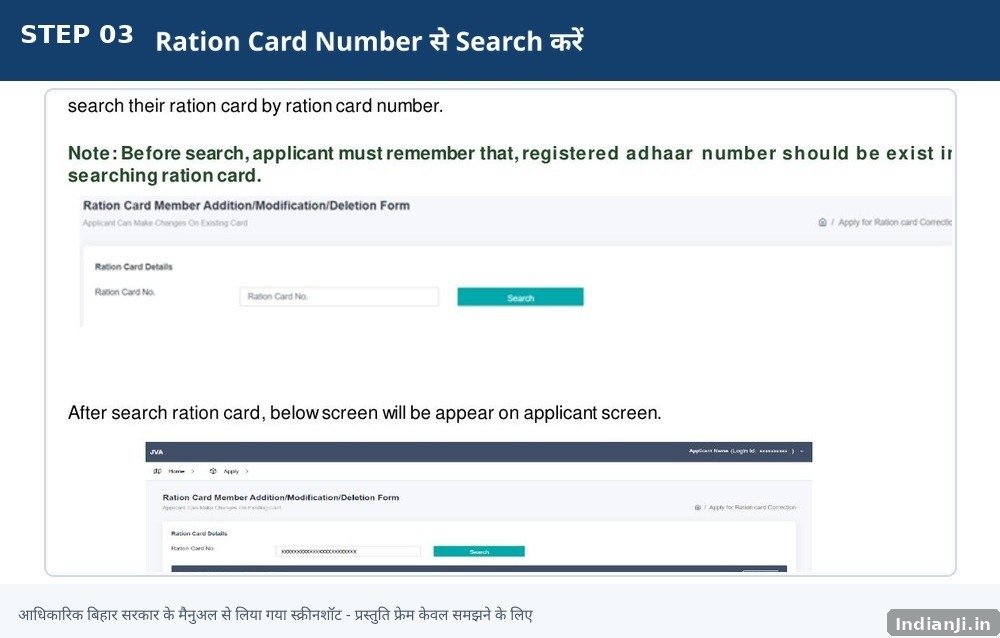
Official Bihar Government manual screenshot — relevant process area with a user-friendly presentation frame.
Existing ration card number दर्ज करें और Search करें.
इसके बाद: अगला step पूरा करें और final submission तक प्रक्रिया जारी रखें.
Step 4: Applicant और Member Details verify करें
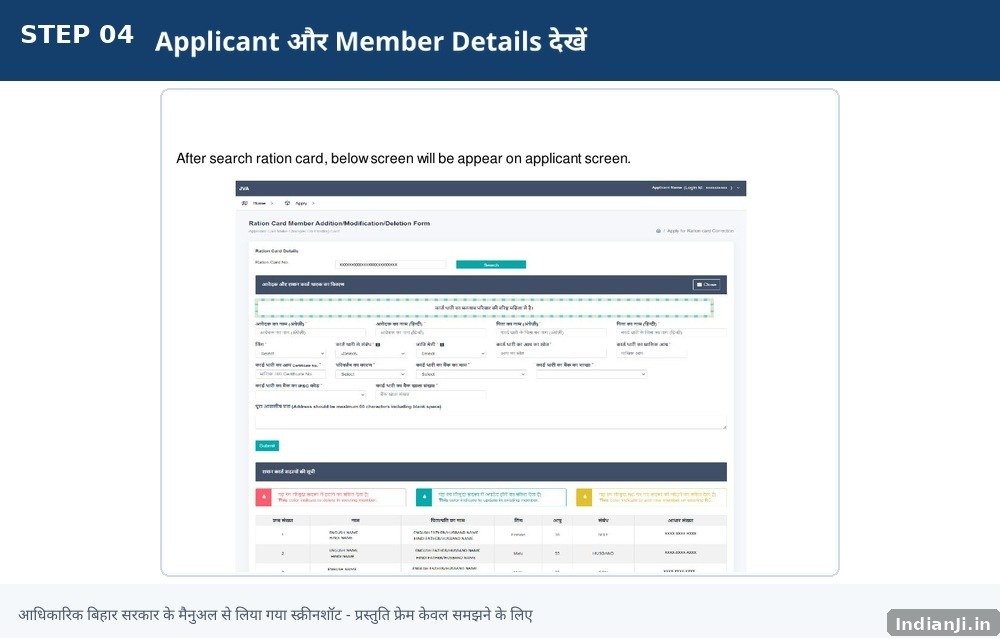
Official Bihar Government manual screenshot — relevant process area with a user-friendly presentation frame.
Applicant तथा family member details को ध्यान से check करें.
इसके बाद: अगला step पूरा करें और final submission तक प्रक्रिया जारी रखें.
Step 5: नया सदस्य जोड़ें
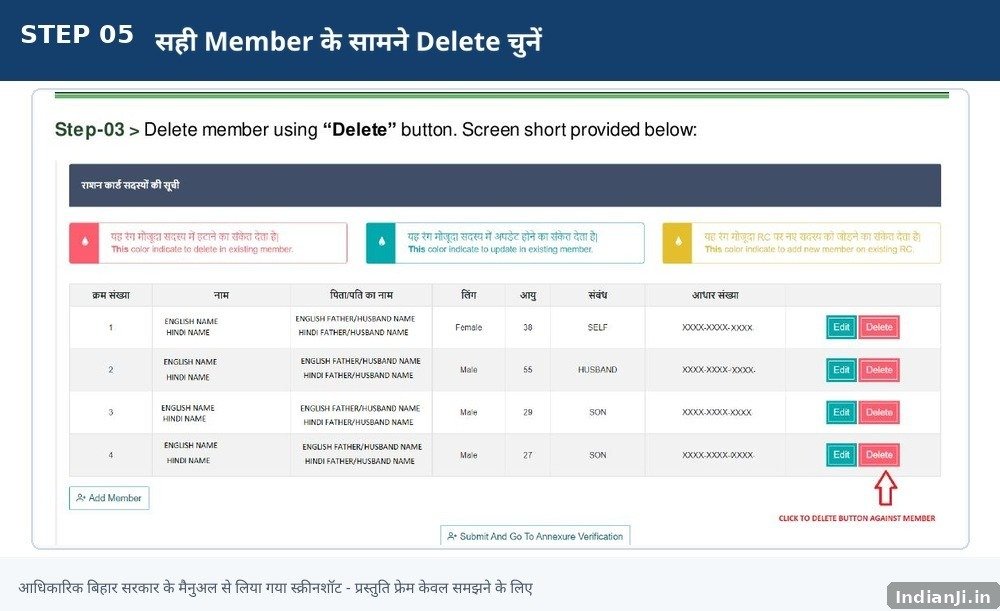
Official Bihar Government manual screenshot — relevant process area with a user-friendly presentation frame.
जिस परिवार सदस्य का नाम जोड़ना है, उसके लिए “नया सदस्य जोड़ें” विकल्प चुनें और आवश्यक जानकारी भरें.
इसके बाद: अगला step पूरा करें और final submission तक प्रक्रिया जारी रखें.
Step 6: Annexure Verification पूरा करें
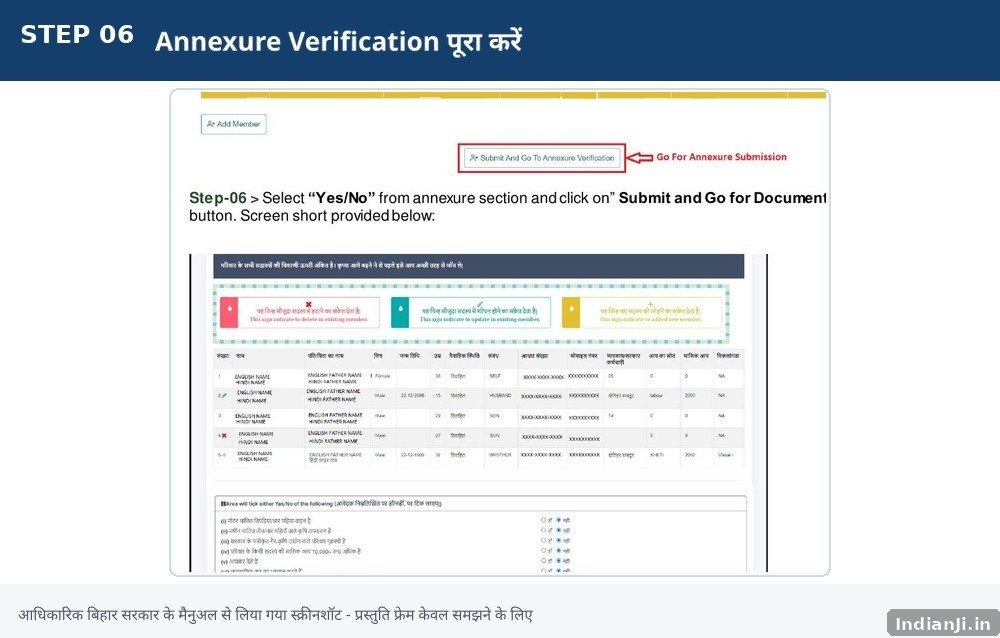
Official Bihar Government manual screenshot — relevant process area with a user-friendly presentation frame.
सदस्य की जानकारी जोड़ने के बाद Annexure Verification के लिए आगे बढ़ें.
इसके बाद: अगला step पूरा करें और final submission तक प्रक्रिया जारी रखें.
Step 7: जरूरी Documents Upload करें
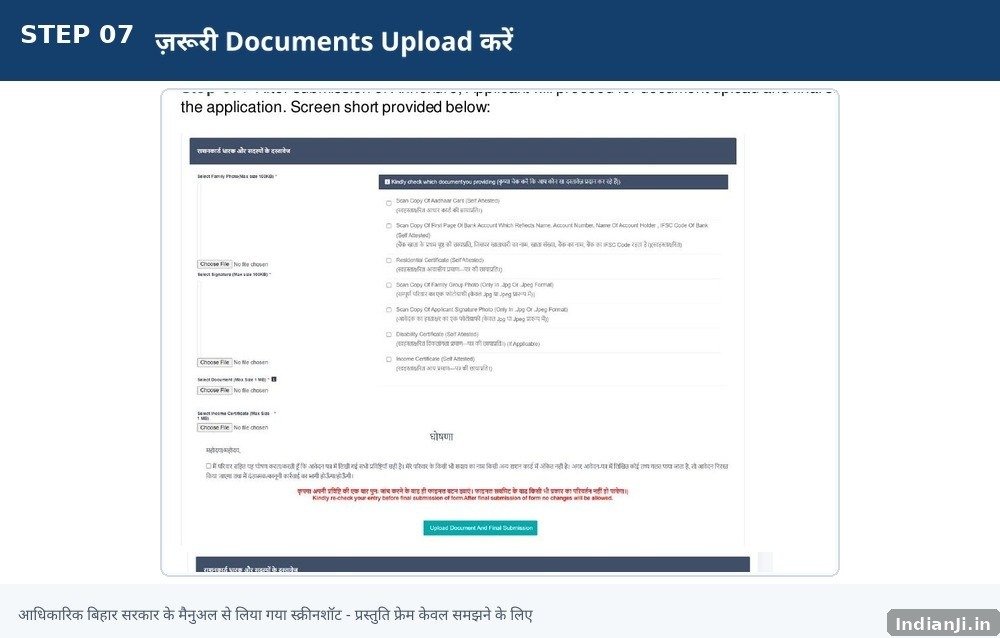
Official Bihar Government manual screenshot — relevant process area with a user-friendly presentation frame.
Portal पर मांगे गए documents upload करें.
इसके बाद: अगला step पूरा करें और final submission तक प्रक्रिया जारी रखें.
Step 8: Final Submission करें
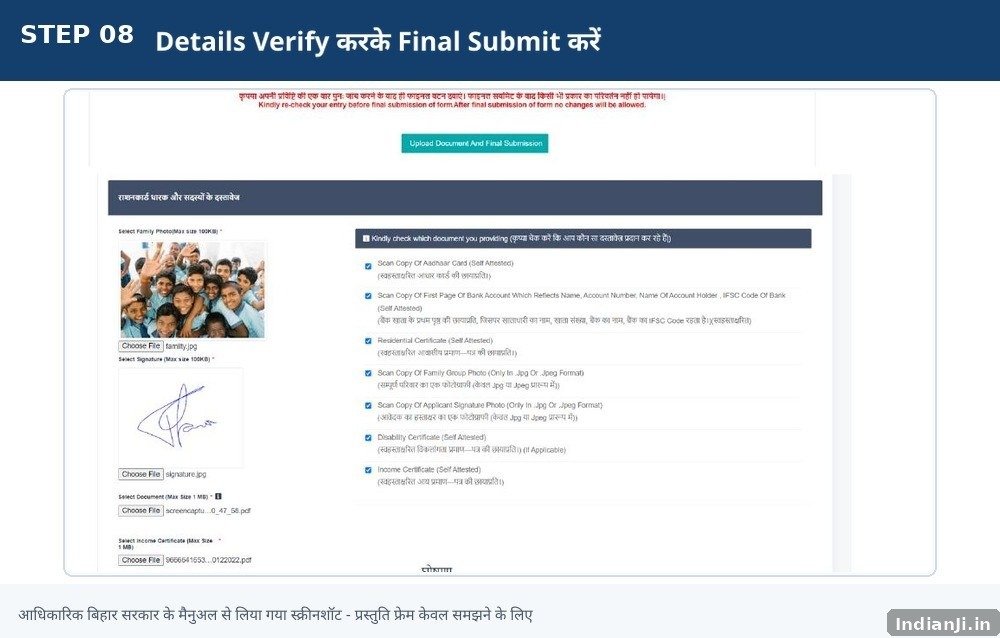
Official Bihar Government manual screenshot — relevant process area with a user-friendly presentation frame.
Details और documents verify करने के बाद final submission करें.
इसके बाद: अगला step पूरा करें और final submission तक प्रक्रिया जारी रखें.
Step 9: Application ID सुरक्षित रखें
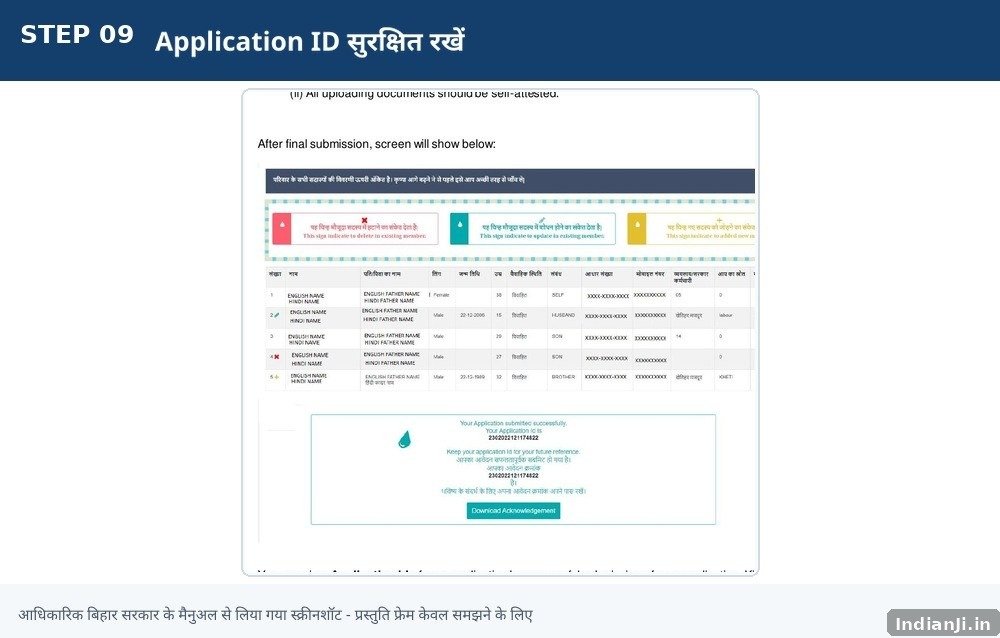
Official Bihar Government manual screenshot — relevant process area with a user-friendly presentation frame.
Successful submission के बाद Application ID/acknowledgement सुरक्षित रखें.
इसके बाद: अगला step पूरा करें और final submission तक प्रक्रिया जारी रखें.
📄 जरूरी जानकारी और Documents
Exact supporting requirements case और current portal instructions के अनुसार बदल सकती हैं. Submit करने से पहले official portal पर दिखाई गई current requirements जरूर देखें.
- Ration Card Number / existing card details
- Concerned member details
- Supporting proof, जहाँ portal/official process में मांगा जाए
- Portal द्वारा मांगे गए documents
📊 Application Status कैसे देखें?
Bihar RCMS के official Application Status page पर जिला, अनुमंडल और RTPS संख्या जैसी details मांगी जाती हैं. Submission के बाद मिली application/reference details सुरक्षित रखें.
⚠️ Important Points
- Add करने से पहले सही member और उसकी details verify करें.
- गलत member की जानकारी submit न करें.
- Final submission से पहले पूरी member list फिर से check करें.
- Application ID/acknowledgement सुरक्षित रखें.
- केवल official Bihar Government portal का उपयोग करें.
- OTP/password किसी अनजान व्यक्ति के साथ share न करें.
⚠️ Common Mistakes
- Wrong member select करना
- Ration Card Number गलत भरना
- Final submission से पहले changes verify न करना
- Application ID save न करना
- Fake website या payment link पर details डालना
🔗 Bihar Ration Card Official Links
| काम | Official Link |
|---|---|
| RC Online / Jan Vitran Ann | Official RC Online |
| Ration Card Management | Official RCMS |
| Application Status | Check Status |
| Existing Ration Card Correction Manual | Official PDF Manual |
| Bihar EPDS | Official EPDS |
❓ FAQs
क्या बिहार राशन कार्ड में नए सदस्य का नाम जोड़ा जा सकता है?
हाँ. Existing Ration Card Correction process के माध्यम से portal पर उपलब्ध Add Member विकल्प का उपयोग करके नए सदस्य की जानकारी जोड़ी जा सकती है.
Add Member option कहाँ मिलेगा?
Existing Ration Card Correction process में member list के action area में Add option दिया गया है.
नया सदस्य जोड़ने के बाद क्या जानकारी फिर से जांच सकते हैं?
Final submission से पहले member details और पूरी family list को ध्यान से verify करें. Portal पर उपलब्ध विकल्पों के अनुसार आवश्यक सुधार करें.
Application Status कैसे check करें?
Official Bihar RCMS Application Status page खोलकर मांगी गई reference details भरें.
🏛️ Official Sources & Source Mapping
- Member addition process: Bihar RCMS / Jan Vitran Ann official portal.
- Add Member process: Bihar Government Existing Ration Card Correction User Manual.
- Application Status: Bihar RCMS official Application Status page.
- Internal navigation: Existing relevant Indianji.in ration-card posts.
Last Verified: 23 August 2026